
Electronic Visit Verification (EVV) Resources for CDPAP Personal Assistants
Electronic Visit Verification (EVV) is a system that electronically confirms when a personal assistant’s (PA’s) visit starts and ends. It captures the date, time, type of service, and location of care in real time.
EVV is required under the federal 21st Century Cures Act, and New York State requires it for all services delivered in the Consumer Directed Personal Assistance Program (CDPAP). Using EVV correctly helps make sure PAs get paid accurately and on time, and helps consumers stay within their approved service authorization. It keeps the program running smoothly for everyone involved.
How to Manage Time with PPL
PPL offers different timekeeping and approval options to accommodate the needs of CDPAP consumers and PAs while maintaining electronic visit verification (EVV) compliance. A full guide to entering and approving time is available below in English and Spanish.
EVV-Compliant Timekeeping Options
PPL provides two EVV-compliant options for PAs and consumers: our Time4Care mobile app and our dial-in phone system (also called “telephony”). Note that consumers may use a third method, PPL@Home, to approve PA hours, but time cannot be entered through PPL@Home.
Time4Care: PPL’s EVV Mobile App
Time4Care is PPL’s EVV mobile app that PAs use to clock in and out of their shifts, view pay information, and manage their time. It is currently available in 16 languages. Use the buttons below to download the app from the Apple App Store (IOS devices) or Google Play (Android devices).
Time4Care Troubleshooting Tips
When to troubleshoot before calling Customer Service:
If you are attempting to use the Time4Care application and receive an error or issue, please check that you have the most recent version of the application on your device. You can update the application via your app store: Apple App Store or Google Play.
Troubleshooting Time4Care – Please follow these steps in order:
- Open the Time4Care app
- Tap the gear icon (Settings)
- Select Update User Data
- Log out and then log back in
If this does not solve the issue, please try the following:
- Remove the Time4Care app from the device
- Reinstall Time4Care from the Apple App Store or Google Play
- Clear the app cache (if you’re on Android)
- Open the gear icon (Settings)
- Tap Apps (or Apps & Notifications)
- Select Time4Care
- Tap Storage or Storage & Cache
- Tap Clear Cache
This removes temporary files without deleting your login information, settings, or personal data.
- After clearing cache restart your phone:
- Press and hold the Power button
- Select Restart
This helps ensure the device loads fresh data and can resolve many app-related issues.
- Uninstall the app
- Reinstall the Time4Care app
- Restart your device after reinstalling
- Check for app updates in the Apple App Store or Google Play
- Try accessing the app from a different device or browser (if using the web version).
When to contact Customer Service:
If you have tried the troubleshooting tips above and the issue persists, please contact Customer Service with the following information:
- Name of the individual who experienced the issue
- Date of the error
- Approximate date and time of the timesheet
- Type of device used with Time4Care (Android or Apple)
- Consumer PPL ID
- Personal Assistant (PA) PPL ID
- Description of the steps taken before the issue occurred
- Exact point where the issue occurred
Tip: If possible, taking screenshots of the issue can help Customer Service resolve the problem.
- Customer Service:
- 1-833-247-5346
- NYCDPAP@pplfirst.com
Video: Time4Care App Setup

Video: Time4Care PA Dashboard Tour

Video: Time4Care Online Clock In and Clock Out
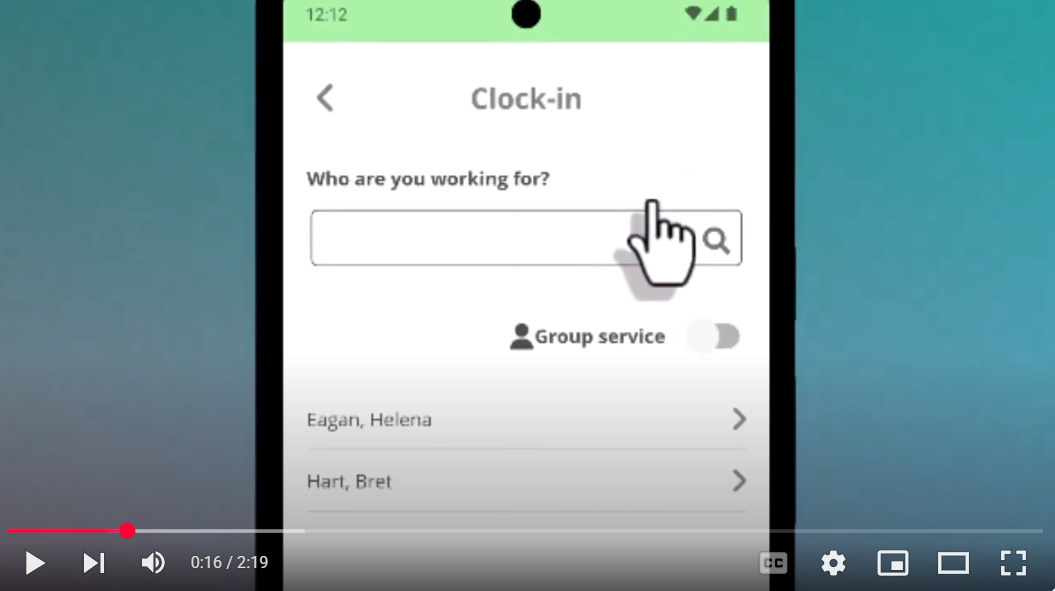
Time4Care EVV Scorecard
PPL has released a new feature in Time4Care called the EVV Scorecard to give personal assistants (PAs) and consumers a clear view of Electronic Visit Verification (EVV) compliance status.
What Is the EVV Scorecard?
The EVV Scorecard provides visibility into EVV compliance performance, identifies the percentage of non-compliant entries, and supports monitoring and improvement of EVV compliance. The scorecard reflects the last 30 days of processed shifts and refreshes on a weekly basis — usually on Saturdays.
The EVV Scorecard will help you:
- See your EVV compliance status at a glance
- Check what percentage of shifts met EVV standards
- Spot and fix compliance issues before they become a problem
How It Works: Color-Coded and Easy to Read
We use a color system so you can get your compliance status in seconds:
🟢 Green
90.00% or higher
Strong compliance — you’re right where you need to be
🟡 Yellow
70.00% – 89.99%
Moderate compliance — there’s room to improve
🔴 Red
Below 70.00%
Low compliance — needs immediate attention
How to View Your Scorecard
If you are a PA:
- Log in to Time4Care.
- Select the My EVV Details tile from your dashboard.
- If you work with more than one Consumer, use the dropdown to view your Scorecard for each one.
If you are a consumer:
- Log in to Time4Care.
- Select an individual PA from the dropdown menu to view their EVV Scorecard.
Want more detail? Select More on your Scorecard to see a breakdown of late submissions, edited entries, and your compliance percentage.
Telephony: PPL’s EVV Phone Line
Calling in to PPL’s telephony system is the other EVV-compliant way for PAs to clock in and out of shifts. For time entries to be accepted, PAs must call the telephony line from the phone number the consumer registered with in PPL@Home. The phone number to enter or approve time is 1-833-278-3959. Telephony is currently available in nine languages.
Telephony Instructions for PAs
- Dial 1-833-278-3959.
- Select your preferred language.
- Select option one to indicate you are the caregiver.
- Enter your 8-digit date of birth.
- Enter the last 4digits of your Social Security Number (SSN).
- Select your consumer from the list.
- Follow the prompts to start a new shift or end your shift.
- If needed, follow the prompts to correct and resubmit entries.
Telephony Troubleshooting Tips
Telephony (EVV Phone System) Support Guide
If you experience an issue while using the EVV Telephony (phone) system, please follow the troubleshooting tips provided below.
When to troubleshoot before calling Customer Service:
Before reporting an issue, please confirm that you are:
- Calling the correct EVV Telephony number.
- 1-833-278-3959
- Selecting the appropriate menu option:
- Press 1 for Personal Assistant (PA)
- Press 2 for Consumer
- Entering your date of birth when prompted.
- EX: MM/DD/YYYY; 06/02/1987
- Entering only the number portion of your PPL ID.
- EX: PPLID: PRV-NY-12345678; you would type in 12345678 ONLY
Best Practices When Using the Telephony System
To help ensure your time is recorded correctly:
- Remain on the line until the entire call is completed.
- Wait for the final confirmation message before hanging up.
- Follow all prompts carefully.
- Verify that you have selected the correct Consumer and Personal Assistant record when prompted.
- Listen for confirmation that your clock-in, clock-out, or approval has been successfully recorded.
Ending the call before receiving confirmation may result in incomplete or unrecorded time entries.
When to contact Customer Service:
If troubleshooting tips are not helpful, please contact our Customer Service line with the following information handy:
Information Needed for Telephony Support
Please have the following information available:
- Name of the individual who experienced the issue
- Date of the call
- Approximate time of the call
- Phone number used to place the call
- Consumer PPL ID
- Personal Assistant (PA) PPL ID
- Description of the steps taken during the call
- Exact point where the issue occurred or the call failed
Tip: If possible, placing a new test call and documenting the exact prompts and responses can help us better identify the issue.
- Customer Service:
- 1-833-247-5346
- NYCDPAP@pplfirst.com
If Your Call Disconnects After Entering the Last Four Digits of Your SSN
- If the call ends unexpectedly after you enter the last four digits of your Social Security Number:
- Verify that you are entering the correct information
- Contact Customer Service and provide the details listed above
- Include any error messages or prompts you received before the call disconnected
Customer Service will review your account and investigate the issue.
Clock In/Clock Out Issues
- If you are unable to clock in or clock out and are prompted to edit a previous entry, there may be an open shift that was not properly completed.
- Please contact Customer Service for assistance if you are unable to use the Time4Care application to modify or remove the timesheet and resubmit the timesheet correctly.
- Customer Service:
- 1-833-247-5346
- NYCDPAP@pplfirst.com
- Customer Service:
Video: Logging Time Through Telephony for Personal Assistants
EVV Frequently Asked Questions
What is your EVV application and how does it work?
PPL’s system, PPL@Home makes it easy to manage information and time worked, whether online or on our EVV app, which is called Time4Care. The system automatically checks that hours worked match up with consumers’ authorization so that PAs get paid correctly. PPL’s tools are built to meet all program requirements and give real-time updates on work shifts.
PAs and consumers without internet access can call in to enter/approve time by dialing 1-833-278-3959 and following the prompts.
What if a consumer or PA does not have reliable internet coverage in their area?
PPL’s Time4Care application allows PAs to clock in and out while in “offline” mode, and then load their time when they can connect to Wi-Fi. Consumers and PAs can also call PPL’s telephony line at 1-833-278-3959 to enter/approve hours.
How can consumers and PAs learn PPL’s EVV application?
PPL provides EVV training to help people understand and follow EVV rules. This helps avoid errors in timekeeping and makes it easier for people to manage their services.
Why can’t I enter all my time at the end of the week?
EVV requires that each shift be recorded when and where services are provided, not grouped together and entered later. When time is entered in batches, it can’t be verified in real time that services happened as authorized. To stay compliant, clock in when you start a shift and clock out when you finish, using PPL’s Time4Care app or telephony line at 1-833-278-3959.
Can I enter or edit my time manually after my shift?
EVV is required by state and federal regulations to confirm that services were delivered as authorized, and manually entering or editing time after a shift does not meet that standard. The most reliable way to stay compliant is to capture your clock-in and clock-out at the actual start and end of each shift through an approved EVV method — either the Time4Care app or telephony line at 1-833-278-3959. Manual entries and edits should be avoided and only used to correct a genuine error.
What happens if I submit my time late instead of when I actually work?
To be EVV-compliant, time must be recorded on the day you work, right when you’re starting and ending your shift, using an approved EVV method. Submitting time after the fact, even a day or two later, does not meet EVV requirements because the visit cannot be verified in real time. Clocking in and out through the Time4Care app or the telephony line at 1-833-278-3959 as your shift begins and ends keeps your time accurate and compliant.
EVV Quick Tips
Here are a few things to keep in mind when logging and approving time:
- Log visits as soon as they start and end.
- Make sure the details of the shift match the scheduled service.
- Review time entries before they are submitted for approval.
For more information on EVV and your responsibilities as a PA in CDPAP, review the letter linked below.